
THE AIRIVO JOURNAL / LIFE AT HOME
A little room. A more considered bedside.
A book before bed. A clear view of the time. A place to leave your glasses. A small nightstand can make room for these everyday moments when each object has a reason to be there.
01 / THE ARRANGEMENT
Keep the essentials. Leave a little room.
02 / THE VIEW FROM BED
Easy to see. Comfortable to reach.
03 / THE EVENING LIGHT
A warm glow, at your own pace.
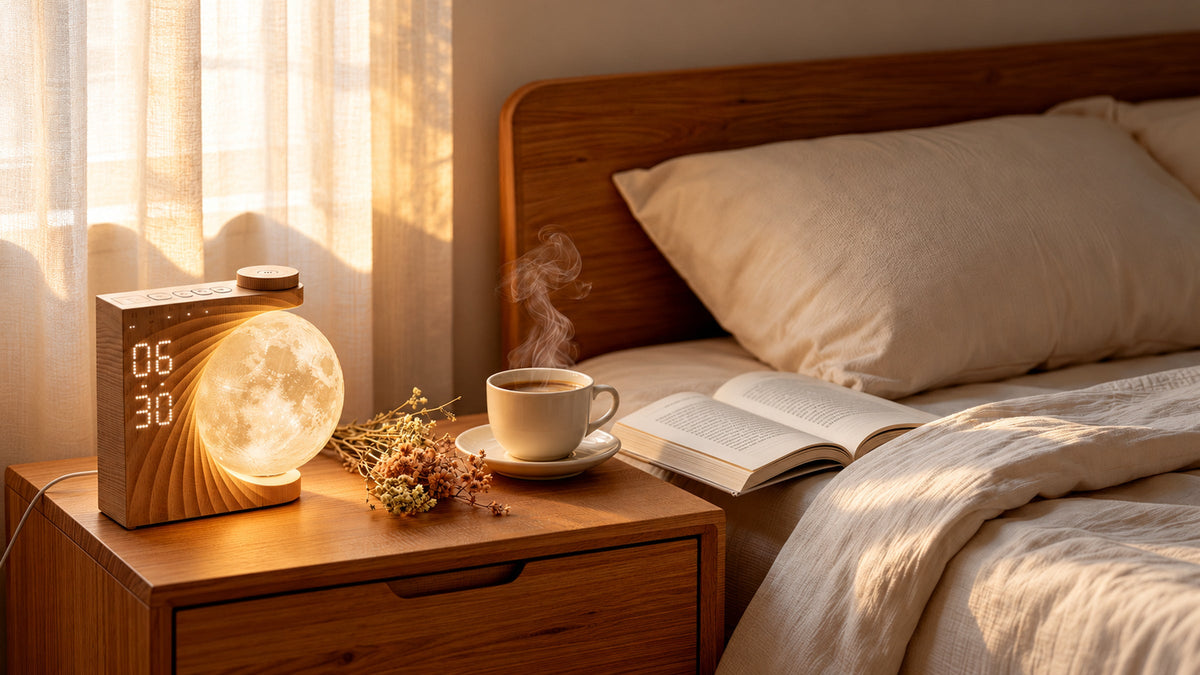
Begin with how you use the space. The wood-grain moon alarm clock in this story combines a time display, ambient light, and built-in sounds. Arrange the everyday essentials first, then choose the settings that suit your evening.
01 / A PLACE FOR EVERYDAY THINGS
Give the Surface Three Simple Jobs

Think of your nightstand as a place for keeping time, supporting an evening habit, and holding a few small essentials. That might mean a clock, your current book, and a spot for your glasses. Someone else might prefer water and a shallow dish for jewelry.
A clock with an integrated light can bring two functions into one place. Check its actual footprint against your table, including space for the controls and power cable. Leave an open spot for the object you put down last each evening.
02 / THE VIEW FROM YOUR PILLOW
Place Your Clock for the View from Bed

A clock can look perfectly placed from the doorway and still be awkward to use from your pillow. Lie down before choosing its final position. Check that you can read the time and reach the controls without leaning across a glass or a stack of books.
Keep the base fully supported on a stable surface, and route the cable toward the back of the nightstand. This moon clock needs a power connection for normal operation, so include the route to an outlet in your layout.
For lights-out, choose high, medium, or low display brightness, or switch the display off. Make that choice from bed rather than judging it in daylight.
03 / A SOFTER END TO THE DAY
Choose Light Around Your Evening

The light you enjoy while settling in may be different from the light you need to read. Use a warm glow for the atmosphere, then check whether the page is comfortably lit in your usual position. Add a dedicated reading light if needed.
The moon clock has three warm night-light brightness levels, separate from its display settings. Try a steady setting after the room lights are off. If you use a colored ambient mode, choose a tone that works with your bedding or wall and keep the rest of the palette simple.
04 / THE WIND-DOWN
Make Space for Sound, Too
If background sound is part of your evening, choose it before settling in. This moon clock has ten built-in sound options, including birdsong, rain, and fan sound. Set a comfortable volume, or leave it off when you prefer silence.
The sound timer offers 30, 60, or 90 minutes. With the timer off, playback continues until you stop it. Choose the setting for that evening; the manual states that a timer setting applies to one use.
05 / AN EASIER MORNING
Plan for the Morning Before Bed
Check the alarm you intend to use and keep the top buttons and dial clear. On this model, the gradual wake-up light is linked specifically to Alarm 2 and begins ten minutes before its set time. Alarm 1 does not use that light function.
The snooze control provides another ten minutes when an alarm is sounding. Try the controls while fully awake, then leave the clock where you can comfortably reach it each night.
06 / THE EVERYDAY RESET
Make the Small Things Easy to Put Away
Give loose items a place they can return to each day. A shallow dish can hold jewelry; a drawer can take spare cables, hand cream, and other things you do not need on display. Choose storage around your habits rather than adding containers for their own sake.
Leave the time display visible, keep water away from the device and its connections, and avoid balancing the clock on a pile of books. A quick morning reset is easier when every item has an obvious place to go.
07 / THE FINISHING DETAIL
Finish with Texture and One Personal Detail
Let the moon-shaped light be a focal point. Pick up the warm tone of its wood-grain finish in a bedside table, or pair it with plain bedding for contrast. Add a small vase, a favorite photograph, or a book you enjoy seeing. The surfaces do not all have to match.

THE CLOCK IN THIS STORY
AIRIVO Moon Sunrise Alarm Clock
A digital time display beside a textured moon light, with built-in sounds and two alarm settings. Choose the functions you use, and give the rest of the nightstand a little breathing room.
ADJUSTABLE DISPLAY · WARM NIGHT LIGHT · BUILT-IN SOUNDS
Normal operation requires a power connection. The gradual wake-up light is tied to Alarm 2. Refer to the product manual and current listing for full details.
Styled scene images illustrate arrangement and atmosphere; they are not measurements of product size or light output.
Finish with a simple check from bed: can you see the time, reach the controls, and put down your glasses? Those everyday movements are a good guide to what belongs on a small nightstand.
BRING THE IDEA HOME
Make room for a bedside you enjoy.
Take a closer look at the AIRIVO Moon Sunrise Alarm Clock, including current product details and availability.
Explore AIRIVO on Amazon →Explore more bedside options in the AIRIVO alarm clock collection.
Frequently Asked Questions
Where should I place an alarm clock on a small nightstand?
Place it where you can read the display from bed and reach the controls comfortably. Use a stable surface with the base fully supported, keep the controls clear, and route the power cable away from the area where you set down everyday items.
Can I turn off the display on the moon clock shown here?
Yes. The supplied AJ320A manual lists high, medium, and low display brightness settings, plus a display-off option. In time display mode, short-press the SNOOZE button to cycle through the settings.
Does the gradual wake-up light work with both alarms?
No. On the AJ320A model shown here, the gradual wake-up light is linked to Alarm 2 and begins ten minutes before its set time. Alarm 1 does not use that wake-up light function.
Can the built-in sounds stop automatically?
Yes. Set the sound timer to 30, 60, or 90 minutes. With the timer off, playback continues until you stop it. The supplied manual states that a timer setting applies to one use, so set it again for your next session if needed.
Does this moon clock run without a power cable?
No. It needs a power connection for normal operation. Its short power-off time memory does not keep the light, sound, or alarm functions operating while unplugged.

Share:
A Different Kind of Night In: 3 Ways to Use a Galaxy Projector
3D Projector Room Ideas: One Room, Many Worlds